
In the world of database management, pgAdmin is widely regarded as one of the best open-source software solutions. Developed specifically for managing PostgreSQL databases, this software offers a user-friendly graphical interface to perform complex database tasks efficiently. Whether you’re a developer, database administrator, or someone learning database management, it helps simplify various operations.
This article will guide you through what it is, its installation process, system requirements, key features, and pros and cons. Additionally, we’ll answer frequently asked questions about this powerful tool and provide a conclusion to wrap up the discussion. So, let’s dive in and explore the world of this amazing software!
What is pgAdmin?
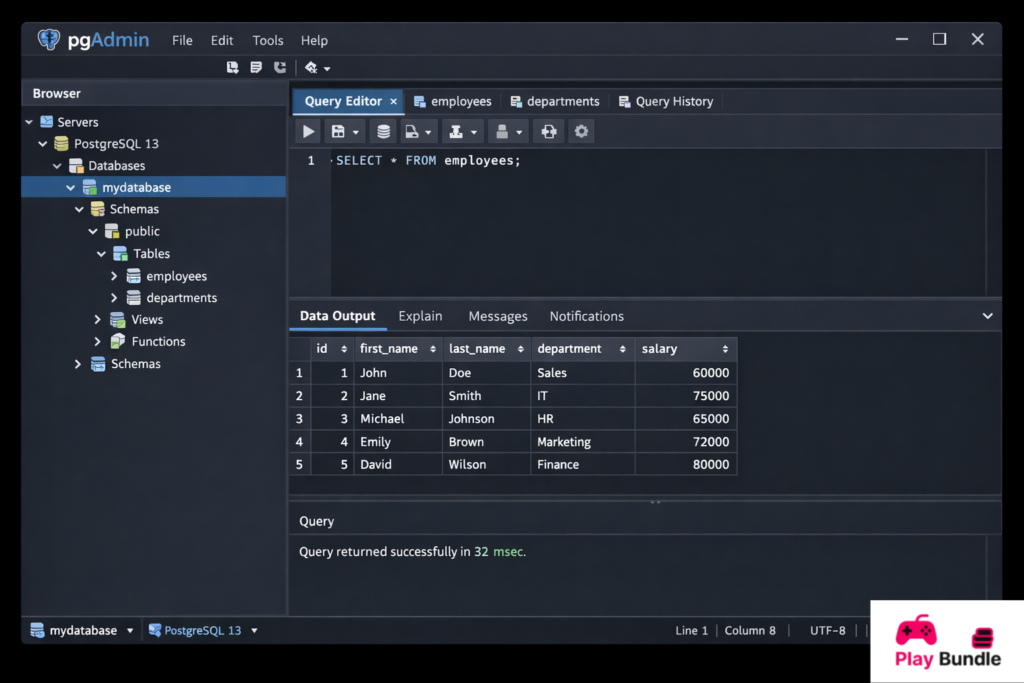
pgAdmin is an open-source database management software designed specifically for PostgreSQL, one of the most powerful and widely-used relational database systems. With its intuitive graphical interface, it allows users to interact with PostgreSQL databases effortlessly, eliminating the need for command-line work for most database management tasks.
Whether you need to create a database, run SQL queries, manage users, or monitor server performance,it provides an all-in-one solution. It is compatible with multiple operating systems, including Windows, macOS, and Linux, making it accessible to a wide range of users.
System Requirements
| System Component | Minimum Requirement | Recommended Requirement |
| Operating System | Windows 7/8/10, macOS 10.12+, Linux | Windows 10+, macOS 11+, Linux Ubuntu 20.04+ |
| Processor | 1 GHz or higher | 2 GHz or higher (multi-core) |
| RAM | 2 GB | 4 GB+ |
| Storage | 500 MB | 1 GB+ |
| Screen Resolution | 1024×768 | 1280×1024 or higher |
| Network | Internet access for updates | Stable internet for cloud-based connections |
How to Install ?
Installing it is a straightforward process. Follow these simple steps depending on your operating system:
For Windows:
- Visit its official website.
- Download the latest stable version for Windows.
- Run the installer and follow the on-screen instructions.
- Once installation is complete, launch it from your Start menu.
For macOS:
- Go to the official website and download the macOS version.
- Open the downloaded file and drag the pgAdmin icon to your Applications folder.
- After installation, open it from the Applications folder.
For Linux:
- Open the terminal and use the appropriate command for your distribution. For Ubuntu, run:
sudo apt-get install pgadmin4 - Once the installation is complete, launch it from your applications menu.
Key Features:
It comes with a variety of features that make it a robust tool for managing PostgreSQL databases. Below are some of its key features:
- Graphical Interface: A user-friendly GUI to interact with PostgreSQL databases without needing to use complex commands.
- SQL Query Tool: Allows you to write and execute SQL queries directly within the application.
- Database Management: Supports creating, modifying, and deleting databases, tables, and other database objects.
- Data Import and Export: Enables easy importing and exporting of data in various formats.
- Server Monitoring: Offers real-time server status and logs to track database performance.
- Security Features: Secure user authentication and role-based access control.
Pros and Cons
Pros:
- Open-source and Free: It is completely free to use, with no hidden costs or licensing fees.
- Cross-platform Support: Works on Windows, macOS, and Linux, ensuring compatibility with most systems.
- Easy to Use: The intuitive interface simplifies database management tasks, even for beginners.
- Comprehensive Tools: It offers a variety of tools for managing, monitoring, and securing PostgreSQL databases.
- Active Community: The open-source nature of it means there’s an active community for support and updates.
Cons:
- Performance Issues on Large Databases: It can sometimes experience performance lag when working with extremely large databases.
- Limited Support for Non-PostgreSQL Databases: While pgAdmin is designed specifically for PostgreSQL, it lacks support for other database types like MySQL or SQLite.
- Requires Installation: Unlike some cloud-based database tools, it requires installation on your system, which may be inconvenient for users who prefer browser-based solutions.
FAQs
1. What is the main function of pgAdmin?
It is primarily used for managing PostgreSQL databases. It provides a graphical interface for creating, querying, and monitoring databases, making it easier for users to interact with their databases without needing to use the command line.
2. Can I use it with cloud databases?
Yes, it supports cloud databases, as long as they are based on PostgreSQL. You can connect it to a cloud-based PostgreSQL server and manage it just as you would a local database.
3. Is it suitable for beginners?
Absolutely! It is designed with ease of use in mind. Its intuitive interface is perfect for beginners who are just starting to learn PostgreSQL and database management.
4. Does it support multiple database connections?
Yes, it supports multiple database connections, allowing you to manage several PostgreSQL databases at the same time, whether they are local or remote.
5. Is pgAdmin free to use?
Yes, it is completely free to use. It’s an open-source software, so you can download, install, and use it without any licensing fees or hidden charges.
Conclusion
pgAdmin remains one of the most popular open-source tools for managing PostgreSQL databases. With its user-friendly interface, powerful features, and cross-platform compatibility, it provides a comprehensive solution for developers and database administrators. Whether you are working with local databases or remotely, it simplifies database management and boosts productivity.
If you’re looking for an efficient and cost-free way to manage your PostgreSQL databases, pgAdmin is the perfect tool to get started with.
